
DPS Meter (DPS Tracker)
What it is
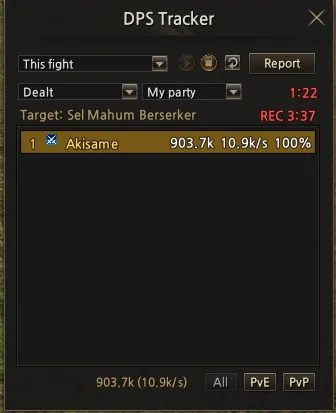
A combat meter that shows damage dealt, damage received and healing, per skill, for you, your party or your command channel. Everything stays on your character: nothing is saved, and the data is cleared when you log out.
How to open it
Click the DPS button (fire icon) on the bottom bar.
Recording (Start / Stop)
- Nothing is recorded until you click Start (▶).
- The maximum recording time is 5 minutes: after that the DPS Meter stops recording by itself. The time left is shown as REC 3:37. Click Stop (■) to stop earlier, or Start again to record another 5 minutes.
- Only your own recording is affected: other players keep recording normally.
DPS Tracker (list)
- Choose the view: This fight, Whole session or an earlier fight. The last 10 fights are kept.
- Choose what to see: Dealt, Received or Healed.
- Choose whose numbers: you, your party or your command channel.
- Filter by All, PvE or PvP.
- Each row shows the total, damage per second and the share of the group.
- The clear button erases the current fight. Shift + click erases everything.
Battle Report (details)
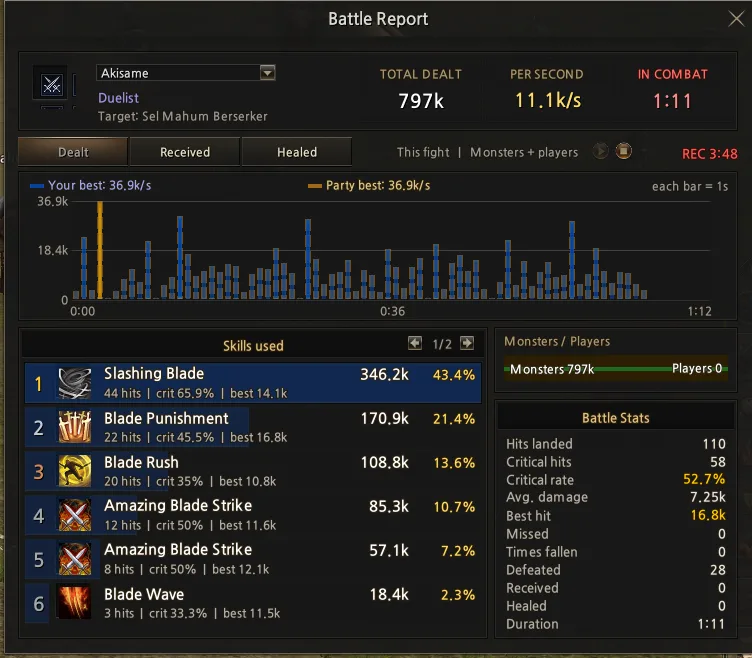
Click Report or a row of the list to open the report:
- Total, damage per second and time in combat;
- a second-by-second graph, with your best moment and the party best;
- skills used, with hits, critical %, best hit and each one's share of the total;
- the split between Monsters and Players;
- Battle Stats: hits, criticals, critical rate, average damage, best hit, misses, times fallen, defeated and duration.
You can only see another player's report if they are in the same party or command channel.
When a fight ends
After 10 seconds without attacking, taking damage or healing, the fight ends and goes to the history. The next attack starts a new fight.