
World Zones (Zone Channels)
This season there is no "Dimensional Veil" Dual Class instance. To make up for it, a new system has arrived that helps in several ways: zone channels.
What it is
Some open-world hunting zones have channels. Each channel is a copy of the same zone, in the same place, with its own mobs and only the players of that channel. This makes hunting less crowded when the zone is full.
How to use it
- Enter the zone area: the Channels icon shows up on your screen for a few seconds, and your current channel is shown on the bottom bar.
- Click the icon or the bottom bar to open the Zone Channel Select window.
- Choose the channel and click OK: you are moved to a hunting spot in that channel.
- To go back, open the window again and choose Main World.


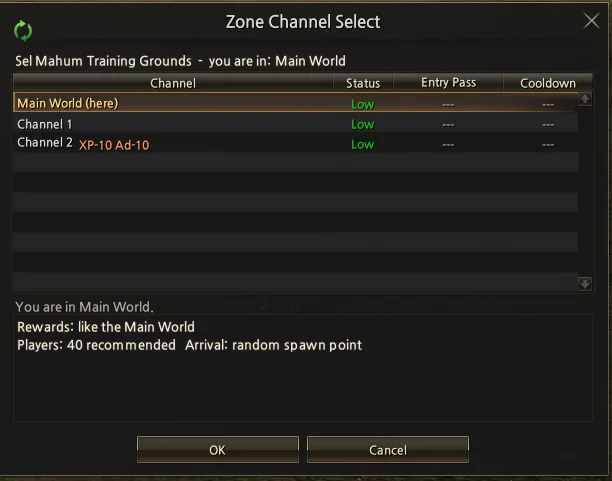
Sel Mahum Training Grounds channels
| Channel | Rewards |
|---|---|
| Main World | normal |
| Channel 1 | normal |
| Channel 2 | -10% XP and Adena |
Depending on how many players are in the zone, our team may add more channels whenever we think it is needed.
What the window shows
- Status: how full the channel is (Low, Avg, High or Crowded), compared with the recommended number of players.
- Recommended is not a limit: you can enter even when a channel is Crowded, but hunting is less efficient.
Rules
- You can only switch channels out of combat and without a PvP flag.
- You must wait 60 seconds between switches.
- Inside a channel you cannot walk out of the area. To leave, use a teleport or go back to the Main World through the window.
- If you die and choose To village, you return to the Main World.
- If you log out inside a channel and come back within 10 minutes, you return to the same channel.
- Shared positions follow the channel: if a player shares their position while in Channel 1 and you use it, you go to Channel 1.